
Last updated on
Nov 9, 2026

RI Mortgage Pre-qualification free printable template
pdfFiller is not affiliated with any government organization

Fill out
Complete the form online in a simple drag-and-drop editor.

eSign
Add your legally binding signature or send the form for signing.

Share
Share the form via a link, letting anyone fill it out from any device.

Export
Download, print, email, or move the form to your cloud storage.
Why pdfFiller is the best tool for your documents and forms


End-to-end document management
From editing and signing to collaboration and tracking, pdfFiller has everything you need to get your documents done quickly and efficiently.
Accessible from anywhere
pdfFiller is fully cloud-based. This means you can edit, sign, and share documents from anywhere using your computer, smartphone, or tablet.
Secure and compliant
pdfFiller lets you securely manage documents following global laws like ESIGN, CCPA, and GDPR. It's also HIPAA and SOC 2 compliant.
What is RI Mortgage Pre-qualification
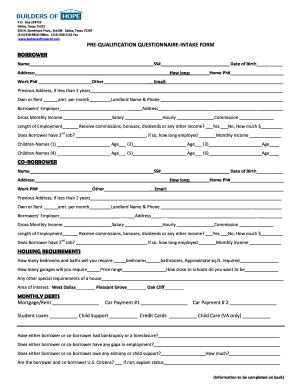
The Rhode Island FirstHomes Mortgage Pre-qualification Form is a real estate document used by applicants to provide essential personal, employment, and financial information for mortgage pre-qualification.
pdfFiller scores top ratings on review platforms




Who needs RI Mortgage Pre-qualification?
Explore how professionals across industries use pdfFiller.

RI Mortgage Pre-qualification is needed by:
-
First-time homebuyers in Rhode Island
-
Co-applicants seeking mortgage pre-qualification
-
Real estate agents assisting clients with funding
-
Financial advisors guiding clients on mortgage options
-
Families looking to explore housing opportunities
-
Individuals wishing to understand their financial standing for a mortgage
Comprehensive Guide to RI Mortgage Pre-qualification
Overview of the Rhode Island FirstHomes Mortgage Pre-qualification Form
The Rhode Island FirstHomes Mortgage Pre-qualification Form plays a crucial role in the mortgage application process. This form is essential for potential buyers to express their interest and readiness for homeownership in Rhode Island. It requires applicants to fill in specific personal and financial details, along with the necessary signatures to authorize processing.
Key fields typically include personal information like name and date of birth, employment details, and income verification. Additionally, it is necessary for both applicants and co-applicants to sign the form, ensuring that Rhode Island Housing can proceed with obtaining a credit report.
Purpose and Benefits of the Rhode Island FirstHomes Mortgage Pre-qualification Form
Mortgage pre-qualification is an essential step for anyone looking to buy a home. By using the Rhode Island FirstHomes Mortgage Pre-qualification Form, potential buyers can simplify the process of demonstrating their financial readiness. This specific form provides clear guidelines and was designed to assist applicants in Rhode Island, helping them understand their borrowing potential.
Utilizing this mortgage application leads to various advantages, including streamlined processing, improved accuracy in financial assessments, and enhanced communication with lenders. It sets a solid foundation for applicants as they navigate the home-buying journey.
Who Should Use the Rhode Island FirstHomes Mortgage Pre-qualification Form?
This form is tailored for a diverse audience including homeowners and first-time buyers. Understanding who qualifies for pre-qualification can greatly influence one’s mortgage application experience. Individuals who are considering co-applicants can also benefit from filling out this form together.
In the context of Rhode Island Housing, those eligible for pre-qualification typically include individuals meeting specific income criteria and residency requirements. Targeting this audience can enhance applicants’ chances of homeownership by ensuring they engage fully with the mortgage pre-qualification process.
Eligibility Criteria for the Rhode Island FirstHomes Mortgage Pre-qualification Form
Applicants must meet certain eligibility criteria for the Rhode Island FirstHomes Mortgage Pre-qualification Form. Essential requirements often include age restrictions, income levels, and proof of residency in Rhode Island. Additionally, applicants should be aware of specific state considerations that might affect their approval process.
-
Minimum age requirement is typically 18 years.
-
Demonstration of stable income sources is crucial.
-
Residency in Rhode Island is mandatory for applicants.
-
Co-applicants should also meet similar financial criteria to strengthen the application.
How to Fill Out the Rhode Island FirstHomes Mortgage Pre-qualification Form Online (Step-by-Step)
Filling out the Rhode Island FirstHomes Mortgage Pre-qualification Form online can be a simple process if followed step-by-step. Begin by gathering all necessary documentation including pay stubs, tax returns, and details of any additional income.
-
Access the form on the pdfFiller website.
-
Enter your personal information including your complete name and date of birth.
-
Provide employment details and income verification.
-
Review each section for completeness.
-
Sign the form digitally or prepare a wet signature if preferred.
Common Errors and How to Avoid Them When Filling Out the Form
Many applicants face challenges while filling out the form, leading to common errors that can delay the process. Understanding these pitfalls can significantly enhance accuracy and efficiency.
-
Omitting key personal details such as full names and birthdates.
-
Inaccurate income reporting that can misrepresent financial capability.
-
Failing to include all required signatures on the form.
Using a review and validation checklist before submission can help prevent such issues.
Signing the Rhode Island FirstHomes Mortgage Pre-qualification Form
Signing the Rhode Island FirstHomes Mortgage Pre-qualification Form correctly is crucial for both applicants and co-applicants. This ensures that the form is legally binding and that all parties consent to the information provided.
Digital signatures provide a convenient option, while wet signatures remain acceptable for traditional methods. Understanding the requirements of each can help streamline the process, ensuring compliance with Rhode Island Housing regulations.
Submitting Your Rhode Island FirstHomes Mortgage Pre-qualification Form
Once the form is filled out and signed, applicants must ensure it’s submitted correctly. Knowing the appropriate channels for submission can prevent delays in processing.
Generally, completed forms can be submitted online or mailed directly to Rhode Island Housing. After submission, applicants should expect an acknowledgment and information on processing times, which is typically communicated via email or direct contact.
Making Corrections or Amendments to Your Form Submission
Should applicants need to make corrections or amendments after submission, it’s important to understand the procedures involved. Correcting any mistakes promptly can prevent misunderstandings and facilitate smoother processing.
The process usually entails contacting Rhode Island Housing for directions on how to properly amend or resubmit the form to ensure that all information reflects current and accurate data.
Why Choose pdfFiller for Your Rhode Island FirstHomes Mortgage Pre-qualification Form Needs
pdfFiller offers an efficient solution for completing the Rhode Island FirstHomes Mortgage Pre-qualification Form, simplifying the experience with fillable forms and secure eSigning capabilities. Its user-friendly interface ensures that sensitive documents are handled with the utmost security.
With robust features for editing and organizing documents, pdfFiller represents a reliable choice for applicants looking to streamline their mortgage application process while ensuring compliance with security standards.
How to fill out the RI Mortgage Pre-qualification
-
1.Access the Rhode Island FirstHomes Mortgage Pre-qualification Form on pdfFiller by visiting the website and searching for the form title.
-
2.Once located, click on the form to open it in the pdfFiller interface.
-
3.Familiarize yourself with the layout, including fields for personal information, employment details, and financial data.
-
4.Before starting, gather required documents such as recent pay stubs, tax returns, and proof of additional income to streamline the process.
-
5.Begin filling out the form by clicking on each field to enter information such as your name, date of birth, and address.
-
6.Use the checkboxes provided to indicate applicable information where necessary, ensuring you follow the explicit instructions within the form.
-
7.Regularly review your inputs for accuracy to minimize mistakes, specifically in sections requiring numerical data.
-
8.Once completed, take a moment to go through the entire form to verify that all required fields are filled in correctly.
-
9.Finalize your form by adding the signatures of both the applicant and co-applicant as required, ensuring you’re authorized to obtain a credit report.
-
10.After reviewing, save your changes on pdfFiller and choose to download a copy or submit it electronically according to your preference.

Who is eligible to complete the Rhode Island FirstHomes Mortgage Pre-qualification Form?
Eligibility typically includes first-time homebuyers in Rhode Island, as well as co-applicants seeking pre-qualifications for mortgages. It's designed for individuals looking to explore housing funding options with Rhode Island Housing.
What documents do I need to provide when filling out the form?
Applicants should have recent pay stubs, tax returns, and proof of additional income ready before starting the application. These supporting documents are essential for accurate financial assessment.
How do I submit the completed Rhode Island FirstHomes Mortgage Pre-qualification Form?
Once you have completed and reviewed the form on pdfFiller, you have the option to save, download, or submit it electronically. Follow pdfFiller's prompts to ensure it reaches the right department.
What common mistakes should I avoid when filling out this form?
Common mistakes include missing required fields, providing incorrect financial data, or failing to sign the application. Double-checking your inputs can help prevent these issues.
How long does it take to process the form once submitted?
Processing times may vary. Typically, applicants can expect feedback within a few business days after submission, but it's best to check directly with Rhode Island Housing for specific timelines.
Is notarization required for the Rhode Island FirstHomes Mortgage Pre-qualification Form?
No, notarization is not required for this form. However, both the applicant and co-applicant must sign it to authorize the request for a credit report.
What should I do if I'm having trouble accessing the form on pdfFiller?
If you encounter issues accessing the form, check your internet connection and try refreshing the page. Alternatively, you can contact pdfFiller support for further assistance.
Related Content
Related Forms




Related Catalogs
Get the latest insights from our blog


If you believe that this page should be taken down, please follow our DMCA take down process
here
.
This form may include fields for payment information. Data entered in these fields is not covered by PCI DSS compliance.